Some work is too repetitive for skilled people but too messy for simple rules. Think invoices arriving in 30 formats, enquiries that need a judgement call, or a report pulled from 4 systems every Monday. That’s the work AI automation services are built for: handling more work without costs rising at the same rate.
This guide covers what AI automation services are, the 6 main types, the key AI automation trends in Australia, how to choose the right approach, and how to work out ROI.
Key takeaways
- AI automation services combine AI with workflow tools to handle tasks that used to need human judgement.
- There are 6 main types: workflow automation, conversational AI, document intelligence, AI agents, data and analytics automation, and RPA.
- Choose the type of automation before you choose a provider. Most failed projects start with the wrong type.
- Start with one high-volume process, measure the return, then expand.
What are AI automation services?
AI automation services design, build and run systems that combine artificial intelligence with workflow tools to handle manual, repetitive business tasks. They include AI agents, automated workflows, document processing, chatbots and integrations between your business systems.
Unlike a basic script, AI automation can read unstructured information such as emails, PDFs and chat messages, handle exceptions, and pass anything uncertain to a person.
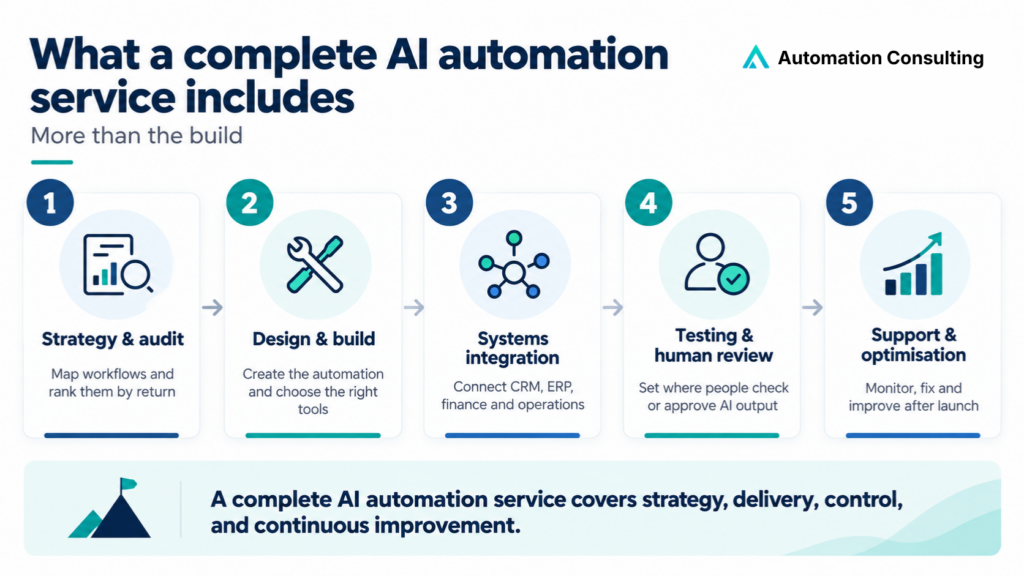
A complete AI automation service covers more than the build:
- Strategy and audit: Mapping workflows and ranking them by return.
- Design and build: Creating the automation and choosing the right tools.
- Systems integration: Connecting your CRM, ERP, finance and operations platforms.
- Testing and human review: Setting where people approve or check AI output.
- Support and optimisation: Monitoring, fixing and improving after launch.
AI automation vs traditional business automation
Traditional business automation follows fixed steps, while AI automation interprets inputs and decides the next step.
A scheduled task that exports a report every morning is traditional business automation. It works until the file format changes, then it stops. An AI system processing supplier invoices can recognise that “Invoice No.” and “Inv #” mean the same thing, read PDFs from dozens of suppliers, and flag unusual amounts for review instead of failing silently.
| Traditional business automation | AI automation | |
|---|---|---|
| Logic | Fixed “if this, then that” rules | Interprets inputs and decides next steps |
| Inputs | Structured and consistent | Varied formats, wording and sources |
| When inputs change | Breaks | Adapts, and escalates what it can’t handle |
| Output | Identical every time | Can vary, so review steps matter |
| Running cost | Very low | Model usage, plus monitoring |
| Best for | Payroll, backups, scheduled transfers | Enquiry triage, document reading, lead qualification |
Rule of thumb: AI automation becomes useful when inputs vary in format, wording or source. If they’re always identical, traditional business automation is cheaper and more reliable. Most strong builds combine both: rules for the predictable path, AI for the steps that need judgement, and people for high-stakes approvals.
The 6 main types of AI automation services
1. Workflow automation
What it is: automation that connects your apps so one event triggers a chain of actions, with AI handling steps that need interpretation.
Example: a new website enquiry creates a CRM record, AI scores the lead and drafts a reply, sales gets an alert, and the source is logged.
- Common tools: n8n, Make, Zapier, Microsoft Power Automate
- Best for: approvals, data entry, notifications, data syncing, and sales and marketing follow-ups
- Not ideal for: old desktop software with no API
Read more: What is AI workflow automation? and our workflow automation services.
2. Conversational AI & customer service
What it is: chatbots, voice agents and AI receptionists that handle customer enquiries 24/7, route support tickets, and qualify leads.
Example: an after-hours enquiry is answered instantly, the AI asks qualifying questions, books a call and updates the CRM.
- Best for: customer service, lead qualification, bookings and repeat questions
- Not ideal for: complaints, sensitive conversations, or anything where a wrong answer creates legal risk
- Must have: a clear route to a human
Read more: Every AI customer service failure has the same shape and our customer service automation services.
3. Document intelligence
What it is: AI that extracts, classifies and checks data from unstructured documents, then sends it into the right system.
Example: supplier invoices arrive by email in different layouts. AI reads each one, matches it to a purchase order, and flags mismatches for review.
- Best for: accounts payable, onboarding, claims, contracts and applications
- Not ideal for: low volumes, where setup won’t pay back
4. AI agents (agentic systems)
What it is: AI that plans multi-step tasks and uses your tools, such as your CRM, email or databases, to reach a goal, deciding the steps as it goes.
Example: an agent researches a new lead, checks your CRM for history, drafts personalised outreach and queues it for approval.
- Best for: research, triage, multi-step support and internal assistants
- Not ideal for: high-stakes decisions without review, or businesses with disconnected systems
5. Data and analytics automation
What it is: automation that collects data from several systems and turns it into dashboards, reports, forecasts and alerts.
Example: every Monday, sales, finance and operations data is combined into one live dashboard, and AI flags unusual results.
- Best for: management reporting, reconciliations, forecasting and performance alerts
- Not ideal for: businesses whose underlying data is inconsistent. Fix the data first.
Read more: Why business reporting fails before it reaches the tool.
6. Robotic process automation (RPA)
What it is: software robots that use applications the way a person does, clicking, typing and copying data between systems. Modern RPA adds AI for reading documents and handling exceptions.
Example: a bot copies approved orders from an old desktop system with no API into a cloud finance platform.
- Common tools: UiPath, Automation Anywhere, Power Automate Desktop
- Best for: legacy systems without APIs, and high-volume back-office work
- Not ideal for: systems whose screens change often, since bots need reconfiguring
The 6 types of AI automation compared
| Type | Best for | Example | Time to first result | Maintenance |
|---|---|---|---|---|
| Workflow automation | Connecting cloud apps | Lead to CRM to follow-up | Days to weeks | Medium |
| Conversational AI & customer service | Customer questions, bookings | After-hours enquiry handling | Weeks | Medium |
| Document intelligence | High document volumes | Invoice matching | Weeks | Medium |
| AI agents | Multi-step knowledge work | Lead research and outreach | Weeks to months | Medium to high |
| Data and analytics automation | Reporting and forecasting | Weekly management dashboard | Weeks | Low to medium |
| RPA | Legacy systems without APIs | Desktop-to-cloud data transfer | 1 to 6 months | High |
When does your business need AI automation services?
Score each process against three signals:
- Volume: It happens many times a day or week, across your team.
- Variation: Inputs arrive in different formats or wording, but the output is standard.
- Cost: Skilled people spend hours a week on it, or delays cost revenue, such as leads waiting for a reply.
Two out of three makes it a strong candidate. Three out of three makes it a priority.
Skip AI when:
- The task follows fixed rules. Moving a form into a spreadsheet doesn’t need AI.
- Nobody can explain the process in a few steps. Fix the process first.
- Mistakes would be serious and nobody can review the output.
Not sure where you stand? Take the 2-minute Automation Readiness Assessment.
DIY tools, a partner or a managed service?
You can get AI automation services in three ways:
| DIY platform | Implementation partner | Managed service | |
|---|---|---|---|
| What you get | Tools your team configures | A provider designs and builds it | A provider builds, monitors and improves it |
| Best for | Simple, clear tasks | Complex or multi-system workflows | Several live automations |
| Setup time | Hours to days | Weeks | Weeks, then ongoing |
| Strategy | You work it out | Included | Included |
| When it breaks | Your team fixes it | Depends on support terms | Provider fixes it |
| Main risk | Automating a broken process; failures across apps that are hard to trace | Dependence on an outside team | Ongoing commitment |
Choose DIY (Zapier, Make, n8n, Power Automate) if your processes are simple and someone on your team is technically confident. Choose a partner if workflows span several systems, touch customer data, or affect revenue when they break. Many businesses do both. They build simple internal automations themselves and bring in a specialist for anything customer-facing or critical to revenue.
4 AI automation trends in Australia for 2026
Australian businesses are moving from trying AI tools to building automation into how work gets done. Four trends are shaping that shift:
1. AI agents are replacing basic chatbots
Businesses are moving from chatbots that answer questions to AI agents that take action across systems. SAP and Oxford Economics found AI supports 29% of tasks in the average Australian business, and leaders expect that to reach 48% within 2 years.
But agents aren’t the answer for every task. Gartner predicts over 40% of agentic AI projects will be cancelled by the end of 2027, mostly due to rising costs and unclear business value. Use agents where a task needs judgement across several steps, and simpler workflow automation for everything else.
2. Rules and AI working together
Even large organisations run mostly on rules-based automation. Services Australia had over 600 automated processes in late 2024, and about 95% of its automations are rules-based. It’s now expanding into AI-powered tools such as document reading, smarter call routing, chatbots and large language models.
3. Trust and regulation are tightening
Australians want AI governed properly before they fully trust it. A Tech Policy Design Institute survey found 85% of Australians support government regulation of AI, and 70% would use AI more if strong rules were in place. Only 1% said they completely trust AI.
The rules are catching up:
- Privacy Act: from 10 December 2026, privacy policies must explain automated decisions that significantly affect people.
- Financial services: APRA’s April 2026 letter warned that AI governance at regulated entities isn’t keeping pace with adoption.
A government survey cited by Services Australia found the 2 biggest factors in building Australians’ trust in AI are protecting personal information (73%) and being transparent about how and where AI is used (67%).
4. Adoption is wide but shallow
Most businesses now use AI in some form. 44% of Australian SMEs reported adopting AI in February 2026. But advice to the Treasurer described uptake as widespread but shallow, with fewer than 1 in 10 businesses reporting significant adoption. Governance lags too: only 22% of Australian organisations said they were mostly or fully ready on AI governance, compared with 33% globally.
The advantage is no longer access to AI tools. It’s workflow redesign, integration and governance. See why businesses hire AI automation companies instead of just buying tools.
Why do AI automation projects fail?
Most failures come down to planning, not technology:
- Automating a broken process: Automation speeds up whatever it’s given, including the mess.
- Doing too much at once: Start with one workflow, measure it, then expand.
- No monitoring or owner: Failures go unnoticed until a customer complains.
- No route to a human: Customer-facing AI that traps people creates complaints, not savings. See what AI customer service failures have in common.
Before anything goes live, run through our AI automation safety checklist.
How to choose the right AI automation service
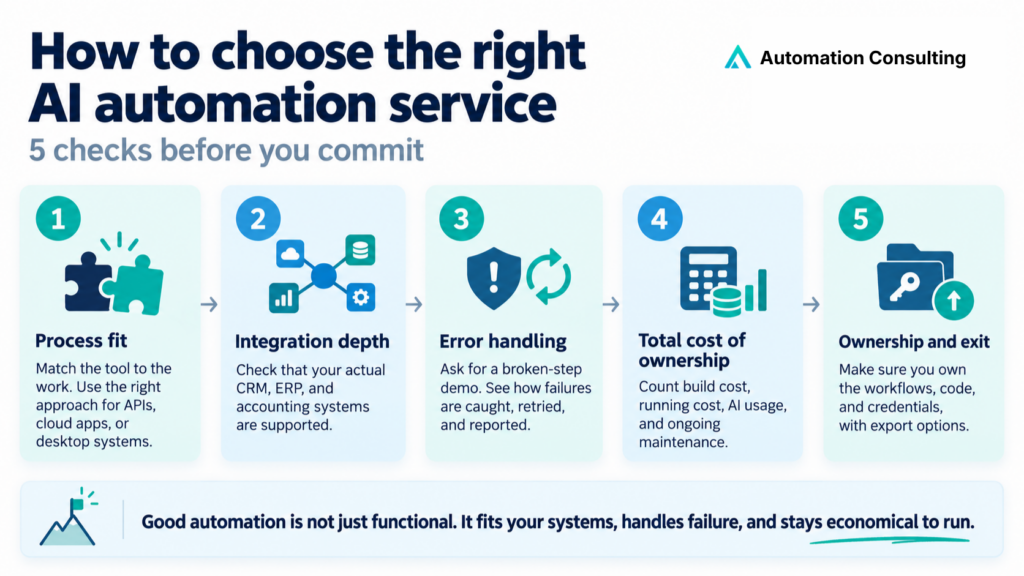
Choose the type of automation first, then the provider. Check any option against five criteria:
- Process fit: The type must match the work. A workflow tool can’t automate a desktop app with no API, and enterprise RPA is overkill for connecting two cloud apps.
- Integration depth: Your specific CRM, ERP and accounting systems should be supported, not just “thousands of integrations”.
- Error handling: Ask for a demo with one step deliberately broken, and see how failures are caught, retried and reported.
- Total cost of ownership: Add the build, running costs, AI usage and maintenance. A cheap tool that needs a consultant every month isn’t cheap.
- Ownership and exit: Make sure you own the workflows, code and credentials, and can export them if you leave.
See our guide to the best AI automation companies in Australia, including 7 questions to ask before you sign.
How to calculate AI automation ROI
ROI compares what a process costs today with what it costs once automated. You need 4 numbers:
- Hours saved per week across everyone who touches the process, minus time spent reviewing AI output.
- Fully loaded hourly cost: base rate plus superannuation (12%), payroll tax, leave and overheads. or a quick estimate, multiply the base hourly rate by 1.25 to 1.3. If your finance team has an actual loaded labour cost, use that instead.
- Annual saving = hours per week × loaded hourly cost × 52.
- Annual cost: build cost plus 12 months of running costs (platform, AI usage, support).
Formulas:
- ROI = (annual saving − annual cost) ÷ annual cost × 100
- Payback period in months = build cost ÷ (monthly saving − monthly running cost)
Worked example (illustrative figures):
An accounts team spends 8 hours a week processing supplier invoices, at a loaded cost of about $70 an hour. Assume automation removes the equivalent of the full 8 hours after review time:
| Amount | |
|---|---|
| Annual cost of the manual process (8 × $70 × 52) | $29,120 |
| Example build cost | $12,000 |
| Example running costs | $300 a month |
| Year-one ROI | About 87% |
| Payback | About 6 months |
| Year-two ROI on ongoing operating cost | About 700% |
This counts time saved only. If automation also speeds up quotes or lead replies, add the extra revenue.
Run your own numbers: the Automation ROI Calculator takes about two minutes. For measuring results after launch, read how to measure AI ROI.
Frequently asked questions
The 6 main types are workflow automation, conversational AI, document intelligence, AI agents, data and analytics automation, and robotic process automation (RPA). Most projects combine two or more.
AI consulting advises on where AI fits and what to prioritise. AI automation services build and run the systems. Some providers do both, which avoids a gap between the plan and the build.
Multiply hours saved per week by your fully loaded hourly cost and by 52, then compare that with the build and running costs. Or use the Automation ROI Calculator.
It can be, if it’s designed with access controls, clear data storage, human review of sensitive decisions, and compliance with the Australian Privacy Act.
The main trends are the move from chatbots to AI agents, rules-based automation combined with AI, tighter privacy rules and public demand for regulation, and adoption that is wide but still shallow.
Get your first automation built free
We’ll put up to 20 hours of real build work into your business at no cost. We’ll find the workflow costing you the most time or revenue and build the automation, so you see results before you commit to anything.
See more Automation Consulting insights in your search results
Tell Google you’d like more of our thinking, and the next piece turns up where you’re already looking.