Category: Tech News

Lastest tech news

  • What Good Looks Like in a Technology Partner

    What Good Looks Like in a Technology Partner

    A good technology partner makes your business more capable and independent — whether you keep working with them or not. This is a practical guide to how to evaluate a technology partner: seven principles, the specific questions to ask, and the evidence to demand before you sign. Use it on any vendor before you commit.

    Most technology partners look identical at the pitch stage. Every firm arrives with a polished deck, a set of impressive logos, and confident language about outcomes. The pricing structures are hard to compare. The case studies are vague. And the questions you don’t know to ask are usually the ones that matter most.

    Knowing how to evaluate a technology partner for the first time is genuinely difficult. You can’t benchmark what you haven’t seen before — and most evaluation guidance either comes from the vendors themselves or treats all technology services as interchangeable. They aren’t. IP Australia’s guidance on IP ownership in contracted work is a useful starting point, but the commercial and operational risks go further than IP alone.

    The framework below is what we use with clients who ask how to evaluate a technology partner — whether they’re comparing options for AI automation, workflow automation, or strategic technical oversight. We give it to them before they’ve made a choice, and we invite them to use it on us. Every principle traces back to an outcome for the business, not a feature of the vendor. Marketing decks look identical. Outcomes don’t.

    Two ways to use each principle: the Ask them question opens the conversation. The Make them show you items close it. Anyone can answer a question well in a pitch meeting. Not everyone can produce the evidence. Push every vendor from telling to showing — that’s where the differences become visible.

    Overview of the seven principles for evaluating a technology partner
    Seven principles, at a glance — each maps to a business outcome.

    01. They protect what makes you defensible

    The outcome you want: Your IP stays a moat. Nothing that makes your business valuable leaks, gets copied, or sits exposed on someone’s laptop.

    Most technology builds accidentally erode the thing they were meant to protect. A rules engine gets ported to a browser. A calculation gets exposed through a public API. A customer-facing document reveals the logic that produces it. By the time you notice, competitors have caught up, and what once separated you is now the industry baseline.

    A good partner filters every architectural decision through whether it exposes your IP. Rules engines run server-side. Customer-facing outputs are flattened, watermarked, and signed. Customers see the result, not the derivation. Access is role-based and audit-trailed by default, not bolted on after the fact.

    Watch for: Vagueness about IP protection. Any suggestion that calculation logic will be exposed to a browser, a customer, or a third-party integration. “We’ll figure out security later.” No distinction between what the platform shows internally and what it shows externally.

    How to Evaluate a Technology Partner: Ask Then Make Them Show You

    Ask them: “Walk me through the specific architectural decision that keeps our IP from leaving the building.”

    Make them show you:

    • A redacted architecture diagram from a previous build showing where the sensitive logic lived and how it was isolated. If they can’t produce one, they haven’t done this before.
    • A reference call with a client whose IP they protected. Ask that client directly: did anything leak? What did the vendor do when a design decision risked exposure?
    • Their standard contract clauses on IP ownership and confidentiality — before you ask for them.

    02. They amplify your people, not replace them

    The outcome you want: Your top experts do more of what only they can do, and less of what shouldn’t require them. The bottleneck shifts, or dissolves entirely. The people who make your business valuable stay valuable — and get to spend their time on work that actually needs them.

    Most knowledge-heavy businesses hit a ceiling set by one or two people’s calendars. The tempting move is to build a platform that routes around the bottleneck — automating the expert out of the loop. That decision fails every time. The expert is still needed; you’ve just made them harder to reach.

    A good partner designs for your experts as first-class users. They understand the difference between routine work (which should flow through the platform) and judgement work (which should route to the expert with everything they need to decide in minutes, not hours). They give your experts control over the rules that govern that routing.

    Watch for: Any suggestion the platform will “handle approvals” or “automate expert review.” Any workflow that still requires your expert to sign off on every routine transaction, leaving the throughput cap unchanged. Any design that hides the expert’s contribution behind the platform rather than making it visible.

    Ask them: “What does our expert’s day-to-day workflow look like after the platform is live? Walk me through it.”

    Make them show you:

    • A reference call with a client’s actual expert — the person whose workflow changed, not the CEO who signed the deal. Ask the expert directly: is your day better or worse than before the platform?
    • A case study from a build where a key person was the bottleneck and what their role looks like now. If every case study is about headcount reduction, that tells you their philosophy.
    • A before-and-after workflow diagram from a real engagement showing where the expert sat in each.

    03. They share the delivery risk with you

    The outcome you want: You pay for delivered work, not for promises. You can see exactly what you’re paying for and why — line by line, month by month. If the vendor stops delivering, you stop paying. Neither side is locked in.

    The traditional consulting commercial model transfers all delivery risk to the client. Time-and-materials with no cap. Fixed-fee that quietly becomes variable when scope shifts. Large upfront payments before value comes back. Opaque invoices where you can’t tell what you actually bought. The vendor gets paid whether or not the work is delivered on time, to spec, or to standard. That is not a partnership.

    A good partner structures things so their business only works if they keep delivering. Every invoice is traceable to a specific piece of work, agreed in advance. Acceptance criteria set before the build starts, not after. Clear exit terms with modest notice periods. If the work stops delivering, either side can walk without penalty.

    Watch for: Time-and-materials with no cap. Large upfront payments before delivery begins. Fixed-fee contracts where every scope discovery becomes a change-request invoice. Invoices that arrive as a single line item with a large number. Any arrangement where you cannot clearly connect a payment to a deliverable.

    How to Evaluate a Technology Partner: Ask Then Make Them Show You

    Ask them: “If we stopped seeing value from your delivery in month three, what would happen commercially? And can you walk me through exactly how your invoicing works — what we’d be paying for and when?”

    Make them show you:

    • A redacted invoice from a real engagement. Can you understand it without the vendor explaining it? Line items, team allocation, what was delivered that month?
    • An example — a real one, with dates — of an engagement where they paused, reduced, or refunded because delivery slipped. If it’s never happened, either they’re perfect or the contract never allowed it.
    • Their standard exit terms in writing, before negotiation starts.
    Comparison of Ask them versus Make them show you questions for technology partner evaluation
    Asking the right question opens the conversation. Demanding evidence closes it.

    04. They design for change, not around it

    The outcome you want: When your business evolves, the platform bends. Scope changes get absorbed, not weaponised. You’re never held hostage to a mid-flight decision.

    Additionally, most builds hit scope changes six weeks in. Either the vendor discovers new complexity, or you learn something you didn’t know at the start. A rigid partner turns that moment into a negotiation, and every adjustment becomes an invoice. A good partner expects it.

    A good partner builds in small, self-contained units. Scope locks at each unit’s start, but honesty runs throughout. They tell you when a change is small enough to absorb and when it’s large enough to warrant a proper conversation, in writing, before anything moves. They surface complexity as soon as they see it — not after the invoice cycle.

    Watch for: Any change process that turns every scope conversation into an invoice. Rigid arrangements that punish adjustment. Vague language about “we’ll re-plan” without a defined mechanism. Vendors who go quiet when complexity emerges and resurface with a change order.

    How to Evaluate a Technology Partner: Ask Then Make Them Show You

    Ask them: “What happens if we discover more complexity halfway through the build? Give me a specific example of how that played out with a previous client.”

    Make them show you:

    • A change log from a real engagement showing which changes were absorbed at no charge and which were re-scoped. The ratio tells you their real philosophy.
    • A reference call with a client whose scope shifted materially mid-build. Ask them: how did the conversation go? Did it feel collaborative or transactional?
    • Their written change-management process, if one exists. No written process usually means the process is “whatever the vendor decides at the time.”

    05. You own the outcome, top to bottom

    The outcome you want: The code, the IP, the platform, the data. Yours. You can extend it, replace it, or take it elsewhere. You are never renting access to your own asset.

    Some technology partners build platforms that only they can maintain. This arrangement makes the client technically the owner but practically the tenant. Six months in, extending the platform means going back to the same vendor, at the same rate, without any alternative.

    A good partner delivers full source code ownership from the start. A shared repository with your team credentialled from day one. Documentation produced as a work artefact, not an afterthought. Another partner could pick up the codebase within a week if you needed them to.

    Watch for: Any licencing arrangement where you rent access to your own platform. Code that lives only on the vendor’s infrastructure. Exit terms that make leaving expensive, slow, or contingent on the vendor’s cooperation.

    How to Evaluate a Technology Partner: Ask Then Make Them Show You

    Ask them: “If we ended the engagement tomorrow, what could we take with us and what would stay?”

    Make them show you:

    • The repository access structure from a current engagement (redacted). Who has access? Is the client’s team credentialled, or is access “available on request”?
    • A sample of their documentation from a previous build. Could a new developer, with no contact with the vendor, understand it?
    • The strongest proof there is: a reference call with a client who left them and took the platform to another partner — and whether the vendor gave that reference willingly.

    06. They fit into your existing ecosystem

    The outcome you want: The vendors, tools, and partners you already trust keep working. The new platform doesn’t ignite turf wars with your incumbents. Your business runs while the platform is being built, not in spite of it.

    Moreover, very few technology decisions happen in isolation. Most businesses already have an ERP, a CRM, an incumbent development partner, existing licences and contracts. A partner that ignores that ecosystem isn’t proposing a technology solution — they’re proposing a disruption.

    Additionally, a good partner maps your existing ecosystem during discovery. They define the integration boundary with your incumbents in writing before the build starts. Where their scope overlaps with someone else’s, they clarify who owns what — and put it in the contract.

    Watch for: Any suggestion that your existing vendors need to be replaced. Vagueness about integration boundaries. “We’ll take over that work.” Refusal to engage directly with your incumbents. Any pattern of the vendor complaining about an incumbent to you rather than solving it with them directly.

    Ask them: “How do you plan to coordinate with our existing vendors during this build?”

    Make them show you:

    • The name of an incumbent vendor they’ve worked alongside on a previous engagement — then call that vendor, not just the client. The incumbent’s view of them is the least-varnished reference you’ll get.
    • A written integration boundary document from a previous build. If they’ve never produced one, the boundaries were never defined.
    • An example of a scope overlap with an incumbent and how it was resolved — specifics, not principles.

    07. They stay after the build

    The outcome you want: Someone answers when something breaks. Support is a model with names, response times, and a price — not a favour you have to negotiate at 5pm on a Friday. The team that built your platform doesn’t vanish the day it goes live.

    Furthermore, most consultancies specialise in the build phase only. The engagement ends, the team rolls onto the next client, and six months later — when something breaks, or a browser update kills a feature, or you need one small addition — you are starting a new commercial conversation with no guaranteed outcome.

    When you evaluate a technology partner, one of the clearest signals is what their post-build model looks like. A good partner puts this in the proposal, not in a follow-up conversation. Named support contacts, defined response times for different severities, a clear price for ongoing support versus warranty — in writing, before you sign.

    Watch for: No mention of what happens after go-live. Support “available on request” with no defined model. Warranty terms that are vague or absent. Any vendor whose proposal ends at the launch date. A support price that only appears after you’ve signed the build contract.

    Ask them: “It’s six months after go-live and something breaks on a Friday afternoon. Who do I call, what happens next, and what does it cost?”

    Make them show you:

    • Their standard support agreement — response times, severity definitions, pricing — before you sign the build contract, not after.
    • A reference call with a client who is 12 or more months post-launch. Ask them: what happened the last time something broke? How long did it take? What did it cost?
    • The name of the person who would own your account after go-live. If the answer is “we’ll assign someone,” the model doesn’t exist yet.

    How to Evaluate a Technology Partner Using This Framework

    To get the most from this guide on how to evaluate a technology partner, take the “ask them” question from each principle and sit down with every vendor you’re considering. Ask the same questions, in the same order. Do not fill in silences. Do not accept marketing generalities in place of specific answers.

    Then push past the answers. Every principle carries a “make them show you” list — references you can actually call, artefacts they can actually produce, clients who were in your position 12 or 18 months ago. Anyone can answer a question well in a pitch meeting. The evidence is where vendors separate.

    Two questions worth asking every vendor, regardless of principle:

    “Can you show me a client who is no longer working with you, and would they take a call from me?”

    “What would you build differently if you knew from day one that we might not renew?”

    Key question: Does this partner make your business better off, whether you keep working with them or not?

    In practice, the differences in how partners respond to these questions will be diagnostic. Any partner who is uncomfortable with them is telling you something about what the rest of the engagement will feel like.

    You are welcome to use this framework on us.

    If a partner hesitates to be evaluated against it, that hesitation is itself an answer.

    The one-sentence version

    Every principle in this guide to how to evaluate a technology partner is a version of the same question.

    Does this partner make your business better off, whether you keep working with them or not?

    Typically, the vendors who fail this test optimise for lock-in: of your IP, your capital, your expertise, your ecosystem. Every commercial and architectural decision is quietly designed to make leaving harder. However, the vendors who pass it optimise for your leverage. You should end the engagement stronger, more capable, and freer than you started.

    If they have done their job well, you should have more options at the end, not fewer.

  • How to Measure AI ROI: The Sequence Most Companies Get Wrong

    How to Measure AI ROI: The Sequence Most Companies Get Wrong

    If you are trying to work out how to measure AI ROI, Uber’s COO Andrew Macdonald gave the clearest answer by accident, in a May 2026 Rapid Response interview that most companies are quietly living but nobody says out loud. The business had burned through its entire AI coding budget in four months. His conclusion: higher token usage did not translate into a proportional increase in useful consumer features. The link between spend and value, he said, was genuinely hard to draw.

    Most companies are in the same position. Their dashboards show adoption climbing, spend growing, prompts running. None of those numbers answer the question that matters: compared to before AI, what actually got better?

    The reason is structural. A token-usage dashboard is a school attendance record. It tells you whether students showed up. A school with 98% attendance and no learning outcomes is not a good school — it is a very good roll-call system. Most AI programmes work exactly the same way.

    The fix is not a better dashboard. It is running the sequence in the right order.

    Uber COO Andrew Macdonald Rapid Response AI Productivity – Automation Consulting
    Uber COO Andrew Macdonald Rapid Response AI Productivity – Automation Consulting

    The short version

    • Token dashboards measure activity, not outcomes. Spend climbing is not value growing.
    • The correct sequence is literacy, then adoption, then ROI — in that order. Most companies have inverted it.
    • Each step has a concrete test. If you cannot pass the test for step one, step two’s numbers are meaningless.
    • ROI must be measured against a pre-AI baseline. Not tokens consumed. Not hours saved as self-reported.
    • A metric that only exists because AI exists cannot tell you whether AI worked.

    The $1,000 version

    A COO at a company roughly the size of a serious Australian SME set a KPI around AI token usage: spend per engineer. The usual instinct once a number starts climbing and nobody can explain why.

    He spent $1,000 in API costs solving two issues. On a dashboard, that looks like adoption working. But look closer. The $1,000 was on top of his own time: prompting, re-prompting, checking, correcting. The task took roughly the same time it would have taken without AI. He used it anyway, because the company needed the metric to move.

    The spend was not buying capability or productivity. It was buying attendance records at API prices. The roll-call looked perfect. Nobody asked whether the class had learned anything.

    This is not an isolated case. According to Writer’s 2026 Enterprise AI Survey, 59% of enterprises invest at least $1 million a year in AI. Only 29% report significant ROI. PwC’s 29th Global CEO Survey found just 12% of CEOs could identify both reduced costs and grown revenue from AI in the past twelve months.

    The gap between spenders and earners is not technology. It is sequence.

    Writer Workplace Intelligence AI ROI Survey 2026 – Automation Consulting
    Writer Workplace Intelligence AI ROI Survey 2026 – Automation Consulting
    PwC 29th Global CEO Survey AI ROI – Automation Consulting
    PwC 29th Global CEO Survey AI ROI – Automation Consulting

    The sequence that actually works

    AI ROI Measurement Sequence: Literacy, Adoption, ROI – Automation Consulting
    AI ROI Measurement Sequence: Literacy, Adoption, ROI – Automation Consulting

    The order matters. Almost no one follows it.

    Step 1: Literacy

    What it means:

    The people using AI know how to use it well. Not whether they use it — whether they use it well. A team that prompts poorly, cannot verify outputs, and does not know when AI is the wrong tool is a spending team, not a capable one.

    Why it comes first:

    A team with low AI literacy spending confidently looks identical, on a dashboard, to a team with high AI literacy spending confidently. The dashboard cannot tell them apart. This is the same problem software engineers faced a generation ago when they were paid by lines of code written. The engineer who solved a problem in 50 lines got penalised against the one who wrote 500. Precise prompting uses fewer tokens. The dashboard rewards volume. It cannot see quality.

    How to test it:

    Pick one task your team runs regularly. Run it with AI. Compare output quality and time taken against your pre-AI baseline. Three questions:

    • Did the AI-assisted output meet the same quality bar as the manual version?
    • Did it take materially less time, accounting for prompting and verification?
    • Did the person doing it feel in control of the output, or were they hoping it was right?

    If the answer to any of these is no, literacy is the constraint. Do not move to adoption metrics until this passes. A skills session, a prompt library, or a structured review of how the team is actually using the tools will do more than any dashboard.

    AI ROI School Attendance Analogy – Automation Consulting
    AI ROI School Attendance Analogy – Automation Consulting

    Step 2: Adoption

    What it means:

    Once literacy is real, adoption tells you how much of the potential is being captured. Before that point, adoption is spend with better attendance records.

    Why it comes second:

    High adoption across a low-literacy team is a cost problem disguised as a progress metric. You are paying for scale before you have proven the thing scales well. The number goes up. The outcome does not follow.

    How to measure it meaningfully:

    Adoption only means something when measured against a specific workflow with a known literacy baseline. The question is not “what percentage of the team used AI this week.” The question is “what percentage used AI well on the tasks where we know it should help?” Two things to track once literacy is established:

    • Workflow coverage: For the tasks where AI has been proven to work, what percentage are being run through it consistently?
    • Reversion rate: How often do people complete a task with AI and then redo it manually? Reversion is the most honest signal that literacy is not yet there, regardless of what the adoption figure says.

    If reversion is above 20% on a given workflow, treat that as a literacy problem, not an adoption problem. More prompting to use the tool is not the fix.

    Step 3: ROI

    What it means:

    A measurable change in a business metric that existed before AI did. Cycle time. Error rate. Revenue per person. Customer response time. Defect rate. Not tokens consumed, not prompts run, not hours saved as self-reported.

    Why it comes last:

    A metric that only exists because AI exists cannot tell you whether AI worked. The comparison must be to before — which requires having recorded what before looked like.

    How to measure it:

    Three steps.

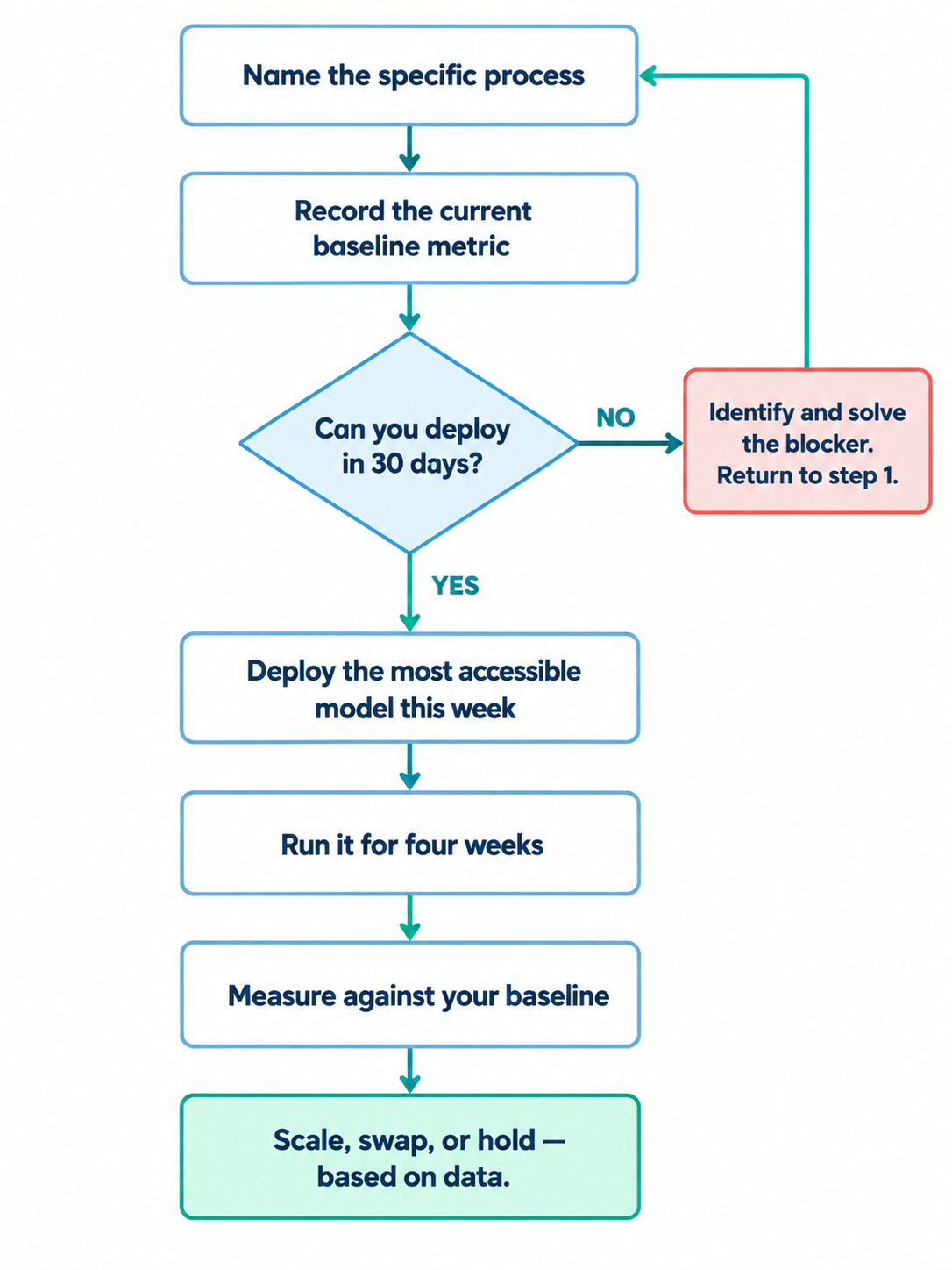
    Set the baseline first. Before any new AI rollout, record current performance on the workflows you intend to change. This takes an afternoon. Reconstruct from historical data if you missed it: project management tools, email timestamps, invoicing records, support ticket logs.

    Run a 30-day comparison. Once AI is operating on the workflow, measure the same metrics over 30 days — not a new set of metrics designed to make the comparison easier. Compare directly.

    Be honest about confounding factors. If the team changed their process at the same time as adopting AI, you cannot cleanly attribute the outcome. Note the confounds and account for them.

    If the outcome metric improved, you have a case for continued investment. If it did not, the constraint is usually literacy, not the tool. Buying more access before addressing literacy does not fix the problem.

    AI ROI: What You're Measuring vs What You Should Be Measuring – Automation Consulting
    AI ROI: What You’re Measuring vs What You Should Be Measuring – Automation Consulting

    This is where most AI automation investments quietly disappoint — not because the tools do not work, but because the measurement framework was wrong before the first prompt was written.

    How to measure AI ROI in practice: a 90-day plan

    For a business starting from scratch, here is what running the sequence actually looks like.

    Days 1 to 30 — Literacy sprint. Pick one team, one workflow. Run the literacy test. Identify gaps. Run one targeted training session or build a shared prompt library for that workflow. Re-run the test. Do not move forward until the team passes it.

    Days 31 to 60 — Adoption measurement. With literacy established on that workflow, measure adoption and reversion. Set a target: 80% consistent adoption, under 20% reversion. If you hit it, the workflow is ready for ROI measurement. If not, go back to literacy.

    Days 61 to 90 — ROI measurement. Compare the 30-day AI-assisted performance against the pre-AI baseline on your chosen metric. Document the result. Use it as the template for the next workflow.

    At 90 days, you have one workflow with a defensible ROI number and a repeatable process for the next one. That is more useful than six months of token dashboards across the whole business. If you want a structured approach to this across your organisation, our technology strategy service is built around exactly this kind of diagnostic.

    What Uber’s problem actually was

    Uber’s problem was never that the budget grew. Budgets for capable things grow.

    The problem is not having an answer, four months in, to the older and far less exciting question: compared to before, what actually got better, and by how much?

    Andrew Macdonald’s test was exactly right: how many projects on the cutting room floor got moved forward because AI accelerated the engineering work? The answer, he said, was hard to draw a clean line to — even when token usage was trending astronomically.

    Counting tokens spent is not the same as counting problems solved. The dashboard has perfect attendance. It just cannot tell you whether the business got smarter.

    If you want to run this diagnostic with support, start with 20 hours free.

    Common questions

    What is AI ROI and how is it measured?

    AI ROI is the measurable change in business performance attributable to AI adoption, expressed against a baseline that existed before AI was introduced. It is calculated by comparing pre-AI metrics — cycle time, error rate, revenue per person, response time — against the same metrics after AI has been running at scale. Token spend, adoption rates, and hours saved as self-reported are activity metrics, not ROI metrics.

    Why can’t I use token usage to measure AI ROI?

    Token usage tells you what AI cost, not what the business gained. A team with low AI literacy spending confidently produces the same token dashboard as a high-literacy team. A high-literacy team will often use fewer tokens because they prompt more precisely — meaning they look worse on the dashboard despite performing better. ROI requires an outcome metric with a pre-AI baseline, not a cost metric without one.

    What should I measure before rolling out AI?

    Before AI adoption, record the baseline performance on the workflows you intend to automate or augment. Relevant metrics depend on the workflow: processing time, error rate, throughput per person, cost per unit, customer response time. Capturing these before adoption is what makes an honest ROI comparison possible later.

    What is AI literacy and why does it come before adoption?

    AI literacy is the practical capability to use AI tools effectively: knowing how to write a useful prompt, when AI is the wrong tool, and how to verify outputs. It comes before adoption metrics because adoption without literacy produces spend, not capability. A team using AI poorly at scale costs more than a team not using it at all, and both look identical on an adoption dashboard.

    How long should I wait before measuring AI ROI?

    Enough time for the workflow to stabilise and for the comparison period to be equivalent to your baseline period. For most operational workflows, 30 to 90 days of consistent AI-assisted operation is the minimum for a credible comparison. Measuring at week two, before the team has developed genuine proficiency, produces results that are neither representative nor defensible.

    Our AI spend is growing but we can’t explain the value. What should we do?

    Pause new adoption and run a diagnostic on one workflow. Reconstruct a pre-AI baseline from historical data. Measure the same workflow with AI over 30 days. If the outcome metric improved, you have a case for continued investment. If it did not, the constraint is likely AI literacy, not tool capability. Buying more access to the tool before addressing literacy does not fix the problem.

  • How to Reduce Claude Fable 5 Cost: 6 Verified Methods

    How to Reduce Claude Fable 5 Cost: 6 Verified Methods

    Fable 5’s free-access window has been extended to July 19, 11:59:59 PM PT. After that, it’s usage credits at $10/$50 per million tokens, double Opus 4.8. We covered what to build before the deadline here. This post is about making whatever time you’ve got left go further.

    None of what follows is “just use it less.” These are six specific, sourced techniques people are actually running, with the real numbers.

    The short version:

    • Drop the effort level: Most tasks don’t need max effort, the accuracy gap is smaller than the cost gap.
    • Let Fable plan, let a cheaper model execute (and vice versa for research): Anthropic’s own advisor tool cuts cost 11.9–85% depending on the pairing; for anything needing current information, have a cheaper model research first via /deep-research, then hand the findings to Fable to plan.
    • Try pxpipe: a free proxy that renders your background context (not your live message) as images, ~59–70% lower bills, but lossy for exact strings buried in that history.
    • Add Ponytail: a “write less code” skill, ~54% less code and ~20% lower token cost, independently corrected down from an inflated first claim.
    • Clean up your inputs: compress noisy output, route by model, /compact often; one developer cut usage ~40–70% doing this alone.
    • Fix your file formats: Markdown over PDF saves 65–90%; crop screenshots instead of uploading them full-size.
    MethodReal savingBest forWatch out for
    Lower the effort levelUp to ~5x cheaper at similar accuracy on easier tasksEveryday tasks, not genuinely hard problemsReal accuracy drop on the hardest tasks
    Advisor / architect pattern11.9–85% cheaper depending on model pairingLong agentic sessions, coding, and research-heavy planningOnly helps if the cheaper model can genuinely handle its half of the split
    pxpipe (image-context proxy)59–70% lower end-to-end billHeavy Claude Code sessions with dense text/codeLossy on exact IDs, hashes, long numbers
    Ponytail (write-less skill)~54% less code, ~20% lower token costCoding tasks prone to over-buildingGains near zero on already-minimal code
    Context hygiene (RTK, repomix, /compact, model routing)~40–70% combined, per one documented workflowAnyone running long or repeated sessionsTakes setup time upfront
    Markdown over PDF65–90% cheaper per documentAny document-heavy workflowComplex visual layouts can lose fidelity in conversion

    1. Drop the effort level. Seriously!

    By default, Fable 5 runs on a fairly high effort setting, and most people never touch it. Anthropic’s own benchmark data shows why that’s expensive: on FrontierCode Diamond, accuracy climbs from about 11.5% at low effort to roughly 30.9% at extra-high – real gains, but not gains that every task needs. On SWE-bench Pro, the spread is smaller: 75.0% at low effort versus 80.4% at extra-high.

    FrontierCode Accuracy vs Cost Benchmark

    That means: if your task isn’t genuinely hard — a web tweak, a straightforward edit, a routine question — running it on max effort is paying architect rates for a job that doesn’t need one. Drop to medium or low with /effort and see how the output holds up first.

    2. Make Fable the architect, not the typist

    Anthropic has an actual feature for this: the advisor tool. Instead of running Fable 5 for an entire session, you let a cheaper model (Sonnet or Haiku) execute the task end-to-end, and only escalate to a stronger model when it hits something it can’t resolve alone.

    The published numbers are real and specific: Sonnet with an Opus advisor cost 11.9% less than running Opus solo while scoring slightly higher on SWE-bench Multilingual.

    Claude Advisor Strategy - Sonnet versus Sonnet + Opus
    Claude Advisor Strategy – Sonnet versus Sonnet + Opus

    Haiku with an Opus advisor cost 85% less than running Sonnet alone, while roughly doubling Haiku’s score on a hard benchmark.

    Claude Advisor Strategy - Haiku versus Haiku + Opus
    Claude Advisor Strategy – Haiku versus Haiku + Opus

    In Claude Code, this is /advisor — or the related /model opus-plan, which runs planning on the stronger model and execution on the cheaper one automatically. The same logic applies to Fable 5: let it plan and make the hard calls, hand the actual typing to Sonnet.

    The reverse pattern works tooFable 5’s knowledge cutoff isn’t yesterday, so if a plan needs current information — recent docs, a changelog, competitor pages — that’s not a job that needs Fable-level reasoning, it just needs someone to go and look. Claude Code’s built-in /deep-research workflow fans out web searches across a cheaper model, cross-checks the sources against each other, and hands back one cited report — which you then feed to Fable 5 to actually plan against. Cheap model gathers the facts, expensive model reasons over them. Running that same fan-out research on Fable 5 itself would blow through your usage cap for a step that doesn’t need its reasoning at all.

    3. Try pxpipe — turn your context into pictures

    This one sounds like a joke and isn’t. pxpipe is a free, open-source local proxy that intercepts requests to Claude Code and converts the bulky, repetitive parts — your system prompt, tool documentation, older conversation history — into PNG images before they’re sent to the model. Claude reads the image back with its vision capability instead of reading it as text.

    pxpipe demo – How to Reduce Claude Fable 5 Cost – Automation Consulting

    What it doesn’t touch matters as much as what it does. Your actual current message and everything the model outputs stay as plain text throughout — pxpipe only targets the static, repetitive background context that gets re-sent unchanged on every turn. That distinction is the whole reason this is usable in practice: the parts where getting the answer exactly right matters most (your live question, its live response) are never run through the lossy part at all.

    The reason it works: Anthropic prices images by pixel dimensions, not by how much text is packed inside them. Dense content like code or JSON can fit roughly 3 characters per image-token, versus about 1 character per text-token. The developer’s own published numbers: a real session that cost $42.21 running as plain text cost $6.06 through pxpipe — a genuine, documented 59–70% reduction on production workloads.

    Two lines to try it:

    npx pxpipe-proxy
    ANTHROPIC_BASE_URL=http://127.0.0.1:47821 claude

    4. Add a “write less” skill

    Ponytail is a free Claude Code skill built around one idea: install a “lazy senior developer” mindset that asks, before writing anything, “does this need to exist at all?” It stops agents from over-building — reaching for a library and a wrapper component when a native browser feature would do.

    Ponytail – How to Reduce Claude Fable 5 Cost – Automation Consulting
    Ponytail – How to Reduce Claude Fable 5 Cost – Automation Consulting

    Worth knowing the full story here, because it’s a good lesson in checking numbers rather than trusting a headline: Ponytail’s first published benchmark claimed 80–94% less code. A user pointed out the comparison was unfair — the baseline being compared against wasn’t given the same instructions, so part of the gap was an artifact of that mismatch. The author accepted the criticism and re-ran it properly. The corrected, defensible number: about 54% less code on average, with roughly 20% lower token cost and 27% faster runs, tested on a real FastAPI/React repository, with zero drop in security or error-handling scores. Independent testing on Opus found even better results than the original Haiku-based benchmark.

    That’s a more honest number than the first version, and it’s still a real saving. Install it in Claude Code:

    /plugin install ponytail@ponytail

    5. Clean up what you feed it before you feed it (the save-tokens-in-Claude-Code stack)

    This is the boring one and probably the highest-leverage one. A developer running a heavy Claude Code workload every day documented the stack that got him a 60–70% reduction versus running everything raw:

    • Compress noisy CLI output before it reaches Claude: A tool like RTK dedupes repeated lines from grep or git diff output — real numbers cited: 76% efficiency on one session.
    • Ship a curated project snapshot, not the whole repo: Tools like repomix (23k GitHub stars) or code2prompt (7k stars) strip lockfiles, build output, and generated code before Claude ever sees the project.
    • Route by task, not by habit: Save the expensive model for planning and genuinely hard problems; let Sonnet handle file-by-file edits. One developer reported this alone cut weekly usage by roughly 40% with no quality drop he could feel.
    • /compact aggressively, or just start a new session: Long conversations get re-read in full on every turn — token cost grows close to quadratically the longer a session runs.
    • Write terse prompts for trivial stuff: The so-called “caveman” style — dropping pleasantries and background context for quick lookups — trades some nuance for a real cut in input tokens. Save full sentences for anything touching production.

    6. Format is a cost decision, not just a preference

    This one’s about what you feed it, not how you run it.

    Markdown beats PDF, and it’s not close. A PDF page can cost Claude roughly 1,500–3,000 tokens, because it’s not just reading your content — it’s processing embedded fonts, layout instructions, and rendering noise you never see. The same content saved or converted as plain Markdown can cut that by 65–90%. If you’re regularly uploading reports, contracts, or proposals as PDFs, converting them first (Microsoft’s free, open-source markitdown tool does this in one step) is one of the cheapest wins available.

    If you are working with screenshots, crop them. A 1000×1000px image costs roughly 1,334 tokens; a cropped 200×200px region of the same image, showing only what matters, costs about 54 tokens — a 25x difference for the same useful information.

    What we’d skip

    Not every “hack” making the rounds is worth your time:

    • Custom tokeniser tricks: Fragile, save pennies, break with the next model update.
    • Prompt-shortening middleware “agents.”: Often add latency and make output worse, not better.
    • Switching providers mid-task to save a few cents: The context you lose costs more than what you saved.

    A word on timing

    Anthropic themselves have said this exploit-the-pricing-gap approach (pxpipe specifically) is unlikely to stay open indefinitely — if enough people lean on it, expect the underlying pricing to move. Treat the specific tricks in this post as a current window, not a permanent floor. The habits — right-sized effort, right model for the job, clean context — are durable regardless of what Anthropic changes next.

    6 Verified Methods to Reduce Claude Fable 5 Cost – Automation Consulting
    6 Verified Methods to Reduce Claude Fable 5 Cost – Automation Consulting

    Common questions

    1. What is Claude Fable 5’s pricing after the free window?

    $10 per million input tokens and $50 per million output tokens — double Claude Opus 4.8’s rate. That’s the highest published rate for any generally available Claude model, which is exactly why the methods in this post matter more once the Claude Fable 5 usage limit resets to standard billing.

    2. Do these tricks work on Opus 4.8 and Sonnet 5 too?

    Yes, mostly. The advisor pattern, context-cleanup habits, and Ponytail all work across models. pxpipe currently defaults to Fable 5 and GPT-5.6 specifically, though it can be configured for others.

    3. Is pxpipe safe to use with sensitive data?

    It runs entirely locally before anything reaches Anthropic’s servers, but because it’s lossy for exact strings, avoid using it on anything where a subtly wrong ID or hash would cause a real problem — keep those in plain text.

    The model doesn’t matter. The implementation does!

    If you want an honest conversation about where AI and automation can genuinely move the needle in your business, that’s what we’re here for. We offer up to $3,000 of real work free to find out.

    Workflow Automation AI Customer Service Systems Integration

    Further reading in this series:

    Claude Fable 5 use cases

    What Claude Fable 5 means for your business

  • Claude Fable 5 Is Back. Here Are the Real Use Cases Worth Building Before July 12

    Claude Fable 5 Is Back. Here Are the Real Use Cases Worth Building Before July 12

    Claude Fable 5 returned on July 1, after the US government’s export-control directive pulled it offline for 19 days. It’s free on Pro, Max, and Team plans again — but only until July 19, and only up to 50% of your weekly usage. After that, it’s usage credits or nothing.

    We covered what Fable 5 actually is when it first launched, and what the ban itself signalled for Australian businesses. This post is the practical follow-up: what can Claude Fable 5 actually do, and what’s worth building with the days you’ve got left.

    What Can Claude Fable 5 Actually Do?

    Short version: it’s not a better chatbot. Claude Fable 5 is built to run for hours on one hard problem — deep coding, long documents, multi-step planning — and check its own work as it goes.

    That’s not marketing language. It shows up in what people have actually shipped with it:

    • Stripe used it to migrate a 50-million-line Ruby codebase in a single day — a job their own team estimated would take two months by hand.
    • A game studio rebuilding HermesWorld (a live MMO) had Fable 5 find and fix six bugs in one afternoon that had accumulated over a month of work with Opus 4.8.
    • Wharton professor Ethan Mollick gave it one shader prompt — an infinite gothic city drowned in stormy waves — then just said “make it better.” No spec, no follow-up detail. It nailed the aesthetic call on its own.
    That’s the pattern worth noticing: the more open-ended and multi-step the task, the bigger the gap between Fable 5 and everything else.

    Claude Fable 5 Use Cases Worth Trying Before July 12

    If you’re deciding what to actually run through it in the next five days, these are the categories worth your usage cap:

    A real audit of something you already shipped

    Multiple users are pointing Claude Fable 5 at products they’ve been running for months and asking it to find what’s actually wrong. It spins up several agents, runs the full test suite, and catches bugs that Opus and GPT had already missed. In one case, it found a sign-out edge case that could leak one user’s data into another user’s account. That’s exactly the kind of quiet, expensive bug most teams don’t find until a customer does.

    A UI or UX pass with a real brief

    If you want to see what Fable 5 is actually capable of, give it more to work with: your brand guidelines, a screenshot, a clear scope of what “done” looks like. That’s where the gap between a nice refresh and a genuinely sharp one shows up.

    Comment
    byu/No_Rip_7664 from discussion
    inClaudeAI
    Comment
    byu/No_Rip_7664 from discussion
    inClaudeAI

    A plan another model executes

    Fable 5’s edge is judgment, not typing speed. The highest-leverage pattern we’re seeing: have it draft the detailed plan — architecture, decisions, risks, open questions — then hand execution to Opus 4.8 or Sonnet. You get the reasoning without paying premium rates for the boilerplate.

    Something that outlasts the model

    Before July 12, use Fable 5 to build things that keep paying off after the window closes: documented workflows, a cleaned-up prompt library, custom instructions in a Claude Project. It’s genuinely better at judging what’s worth documenting — spotting the patterns that repeat, catching edge cases a first draft misses, writing instructions clear enough for a cheaper model to follow later. Think of it as paying a senior person to write the manual once. Most people skip this one. It’s also the one with the real compounding return.

    What to Build With Claude Fable 5 If You Run a Business?

    Translate the above into what it looks like on a Tuesday:

    Marketing teamsFeed it your last quarter of campaign data, competitor positioning, and performance numbers, and ask for a single interactive dashboard you can actually review.
    Sales teamsHand it your call notes, CRM export, and lost-deal reasons from the last quarter and ask it to find the actual pattern in why deals stall — not a generic “improve your pitch” answer.
    OperationsPoint it at a workflow that’s always been “good enough” and ask it to find where it actually breaks under edge cases, not where it looks fine on a demo.
    QA teamsRun the audit prompt across a whole product. It holds context long enough to catch issues that only show up when several parts interact.
    DevelopersUse it for the migration or refactor you’ve been putting off because it touches too many files to safely do by hand.
    Anyone with a vibe-coded internal toolRun the audit prompt before you rely on it for anything customer-facing.

    Automation Workflow Ideas Worth Stealing

    This is the part that matters most if you’re trying to optimise workflows, break through a plateau, or solve a real bottleneck. Here are a few patterns we’ve seen from the community, translated into what they’d actually look like inside a real operation:

    A session-memory skill, so nothing gets re-explained by Hans van Gent

    He built /reflect — a skill that runs a three-phase review at the end of every Claude Code session, pulls out the durable facts and corrections, and writes them back into his config so the next session starts smarter instead of from zero.

    => Business translation: after every client call, audit, or campaign review, have Claude write back what changed into a shared brief — so the next person (or the next session) isn’t starting cold. Something like:

    Summarise the decisions made and corrections given this session. Append anything worth treating as a standing rule to [shared doc]

    You don’t need to build anything custom for this. It’s a standing instruction you type once — “at the end of every conversation, add a summary of what we decided to this document” — and Claude just does it from then on. No code, no developer required.

    Overnight batch runs on your audit backlog by Christopher Duffy

    He handed Fable 9 separate workstreams in a single evening — a knowledge-base audit, a CRM rebuild, and updates across dozens of his own skills — and it held all 9 without dropping the thread.

    => Business translation: most teams have a backlog of “should really get to this” audits — SEO, ad account structure, content, a competitor scan. Queue them as separate briefs and run them overnight instead of spacing them across a month of Tuesdays.

    Automating the tool that has no API by Daniel

    He needed to publish articles to Medium, which offers no public API. Fable 5 handled it anyway, via a Chrome extension running locally, driving the actual publish flow end to end.

    => Business translation: if a supplier portal, a legacy POS, or an old internal tool has no API, this is the workaround — Fable 5 (through Claude Code with browser tools) can watch the manual steps once and replicate them going forward. It’s the same trick behind pulling analytics out of platforms that were never built to share data.

    You show it what you’d normally click through by hand, once, and it figures out how to repeat that on its own. This is more of a “get your IT person or us involved for an afternoon” task than something you’d DIY — but it’s worth knowing it’s possible before you assume a tool’s limitations are permanent.
    A standing assessment system instead of ad-hoc judgement calls by Rich Carr

    He fed Fable 5 a multi-phase scope and had it hold that as the running spec, turning raw field data into scored records against a consistent rubric — with every correction becoming a standing rule rather than a one-off fix.

    => Business translation: this is a lead-scoring or supplier-scoring system that applies the same rubric every time, instead of whoever’s reviewing it that week making a slightly different call. No custom software needed — just write your rubric in plain English, hand over your raw data (a spreadsheet, form responses, call notes), and ask Claude to score every entry against it consistently. The consistency is the win, not the technology.

    Support ticket root-cause mining

    Point it at three to six months of support tickets and ask it to find the actual recurring cause behind your top complaint categories. Then ask it to draft the fix — a macro, a process change, a product tweak — for each one. Run it every 3-6 months and you’ve got a running record of what’s actually improving, what keeps resurfacing, and where the next bottleneck is quietly forming. Fable 5 earns its premium when you want it to run multiple passes on its own — cluster the patterns, then re-check each cluster against the raw tickets, then draft fixes — without its own categorisation drifting along the way.

    How to Use Claude Fable 5 Without Burning Your Whole Week

    Two things worth knowing before you point it at anything important:

    It burns usage fast: Anthropic itself calls it token-intensive by design, and multiple users have reported blowing through a meaningful chunk of a weekly cap in a single ambitious session. Scope the task before you start, not after.
    The new safety classifiers are still over-tuned: Fable 5 automatically hands certain requests to Opus 4.8 when its filters trigger — cybersecurity, biology, chemistry-adjacent topics mostly. Anthropic says this affects under 5% of sessions; some users report it firing on ordinary technical work too. If a routine request suddenly feels different, that’s likely why — rephrase rather than argue with it.

    The model doesn’t matter. The implementation does!

    If you want an honest conversation about where AI and automation can genuinely move the needle in your business, that’s what we’re here for. We offer up to $3,000 of real work free to find out.

    Workflow Automation AI Customer Service Systems Integration
  • Everyone’s talking about Claude Fable 5. Here’s what we think actually matters for your business

    Everyone’s talking about Claude Fable 5. Here’s what we think actually matters for your business

    Anthropic’s most capable model to date, Claude Fable 5 launched June 2026. Unlike previous releases, it’s designed to handle long, autonomous work without hand-holding — think multi-hour tasks, not just better chat.

    Every few months, a new AI model drops and the internet goes into a frenzy. Usually it’s developers sharing things that are genuinely impressive — but hard to connect to the reality of running a business or managing a team.

    This week that model is Claude Fable 5, and the hype is real. But so is the confusion.

    So rather than tell you it’s the best thing ever, we want to share what we’re actually thinking about it — the opportunities, the complications, and what might be worth doing right now if you’re a manager or decision-maker who uses Claude in any part of your work.

    What actually just happened?

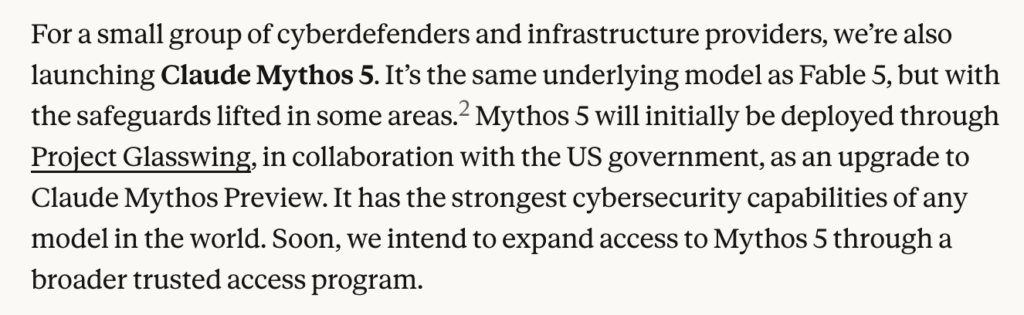
    Anthropic released two models simultaneously: Claude Fable 5 (available to everyone) and Claude Mythos 5 (restricted to select government and security partners through a program called Project Glasswing).

    Here’s the thing most articles skip over: they’re the same underlying model. The only real difference is which restrictions are active. Fable 5 is Mythos 5 with safety guardrails on. Mythos 5 is for vetted institutions where some of those guardrails are lifted.

    Claude Fable 5 & Claude Mythos 5 - Automation Consulting
    Claude Fable 5 & Claude Mythos 5

    Where does Fable 5 sit in the lineup? Think of it as a new tier sitting above Opus. The Claude hierarchy now runs Haiku → Sonnet → Opus → Fable. Fable is the new ceiling for regular business users.

    What does that actually mean in practice?

    Less “slightly better at writing emails” and more “can handle a complex, multi-step project autonomously for hours — and check its own work along the way.” Stripe reportedly used it to complete a codebase migration in a single day that their team estimated would take two months by hand. An independent developer built and shipped an entire software library release in one day — work he estimated would normally take several days.

    That’s not a marginal improvement. That’s a different category of usefulness — for the right kind of work. More on that below.

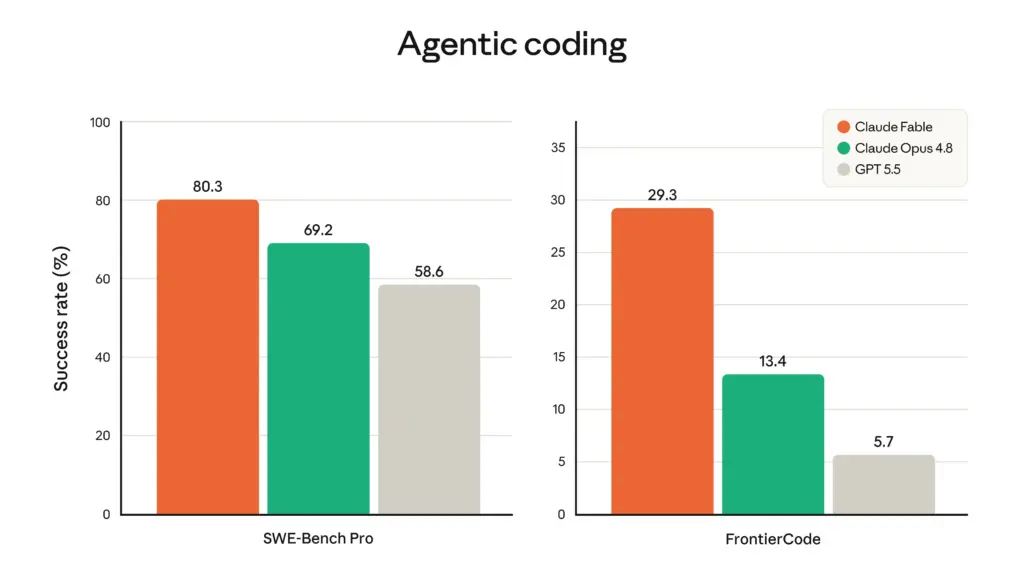
    Claude Fable 5 benchmark - Automation Consulting
    Claude Fable 5 benchmark (Source: Claude)

    The Pricing Window: What to know before June 22?

    Here’s the most time-sensitive part of this post.

    Anthropic is rolling out Fable 5 access to subscription plan users (Pro, Max, Team, Enterprise) in stages — and this is free until June 22. After that, using Fable 5 will require purchasing additional usage credits on top of your existing plan.

    The period until June 22 is essentially a free window to test the most capable Claude model available. Use it to find out whether it actually creates value for your team’s real work. Anthropic has said they intend to bring Fable 5 back into standard subscriptions eventually — but there’s no confirmed date.

    Claude Fable 5 is included in subscription plans only until June 22 - Automation Consulting
    Claude Fable 5 is included in subscription plans only until June 22

    One thing worth noting on usage speed: Early users have reported Fable 5 burns through usage limits faster than previous models. This is something we’ve seen with every major Claude release — more capable models are more compute-intensive, which means they use more of your allocated usage per task. It does make sense given how much more reasoning the model does. Anthropic has signalled they’re working to improve this over time, but for now it’s worth factoring in if you’re on a plan with a weekly usage cap.

    The part that might actually frustrate your team

    This is something Anthropic is transparent about, but worth explaining clearly because it affects day-to-day usability.

    Fable 5 doesn’t always respond as Fable 5.

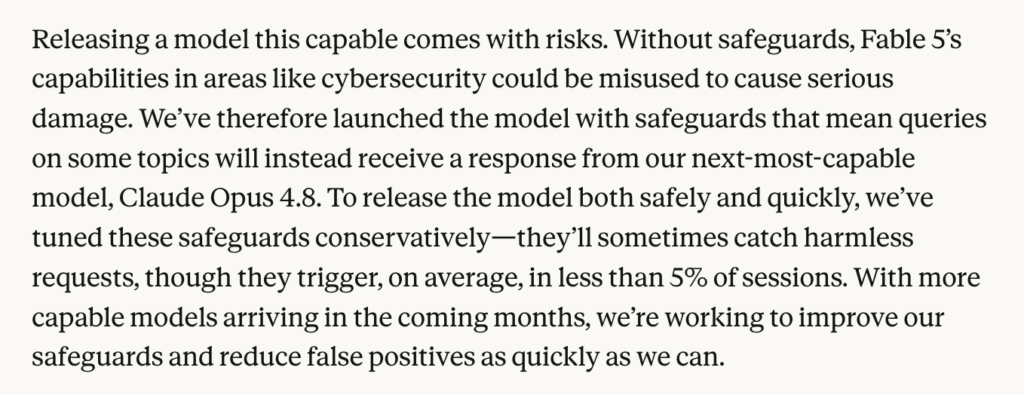
    Because the underlying model is exceptionally capable in areas like cybersecurity and biological research, every request runs through a layer of safety classifiers. When a request touches certain topics — cybersecurity, biology, chemistry — the system automatically routes the query to Opus 4.8 instead. You get told this is happening, but you can’t override it.

    Claude Fable 5 restrictions - Automation Consulting
    When a request touches certain topics, Claude Fable 5 automatically routes the query to Opus 4.8 instead

    Even though Anthropic says this affects fewer than 5% of sessions on average, early user reports in the first 48 hours included some surprising examples — prompts about pulled pork shopping lists, basic biology questions, and even asking about the filters themselves apparently triggered a downgrade to Opus. That said, Anthropic designed the classifiers to be deliberately over-tuned at launch, with plans to reduce false positives over time

    There’s one piece of good news here: you won’t be charged Fable prices for requests that get rerouted to Opus 4.8. So at least the fallback won’t cost you extra.

    Where Fable 5 is actually worth it?

    Fable 5’s edge isn’t in short, single-turn tasks. If your team is using Claude to draft emails, summarise documents, or answer quick questions, Opus 4.8 handles those perfectly well. The premium isn’t worth it for that.

    Where Fable 5 is genuinely different: work that runs long, requires holding a lot of context, involves checking its own outputs, or needs to coordinate across multiple steps without hand-holding.

    Anthropic describes it as built for “days-long, complex, and asynchronous tasks previous models couldn’t sustain” — running in agent harnesses, planning across stages, delegating to sub-agents, and checking its own work. That’s the real differentiator.

    Here’s how that shows up across different roles:

    Marketing managers and brand teams
    Running a full campaign brief that requires synthesising customer research, competitive analysis, and performance data from multiple sources, then producing a structured, reviewable output in a single session. Fable 5 can carry start to finish while flagging its own uncertainties along the way.
    Finance and operations leaders
    Working through multi-stage scenario analysis where each step informs the next — reasoning through the implications, checking internal consistency, and producing a board-ready output. Early testing found it scored highest of any model on Hebbia’s Finance Benchmark for senior-level reasoning, with double-digit gains in document reasoning, chart and table interpretation.
    Legal and compliance teams
    Reviewing a stack of contracts or regulatory documents and producing a structured risk summary — reasoning about what it means and flagging inconsistencies across documents. In blind review, lawyers found its redlines matched or beat their existing model every time.
    Project and operations managers
    Handing off a complex brief — say, restructuring a supplier agreement or building an operational process document — and getting back a draft that’s genuinely ready to review rather than a starting point that needs significant rework. The model proactively fills in gaps rather than stopping to ask about them.
    Retail and ecommerce teams
    Post-campaign analysis that requires pulling together performance data, customer feedback signals, and market context then producing a clear “what worked, what didn’t, what next” synthesis. Particularly useful where the analysis needs to span multiple channels and data types in one coherent output.
    Property and infrastructure teams
    Tender or proposal preparation that requires synthesising project specs, compliance requirements, cost estimates, and precedent documents into a structured submission-ready document. The model’s ability to maintain coherence across a long, multi-part document is where the upgrade shows up.

    The common thread: the more moving parts, the longer the task needs to run, and the more the output needs to be self-consistent — the more Fable 5’s improvements actually matter.

    A real-world comparison of Fable 5 and Opus 4.8, shared on X

    The bigger shift worth watching

    Something worth naming beyond just this model release.

    For the first time, a frontier AI capability has been formally split into two versions — a public version with restrictions, and a restricted version for trusted institutions. Governments, approved security firms, and select research organisations have access to capabilities that are deliberately unavailable to everyone else.

    This might be the right call. The arguments for it are serious and worth respecting. But it does mean AI advantage is starting to become partly a function of your relationship with the AI provider, not just your willingness to pay or your technical capability.

    For most businesses today, this is background context. But it’s a pattern worth watching.

    What to actually do this week?

    Run your real workflows, not demo prompts. Pick the 10-20 tasks your team actually does in Claude every week and run them through Fable 5. Note what’s better, what falls back to Opus, and form a real view before committing.

    The model is genuinely impressive for the right kind of work. The rollout has some real rough edges. And there’s more to figure out about how businesses will actually use it once the dust settles.

    We’re still working through that ourselves. If you’re doing the same, we’d be happy to think through it with you.

    Common questions

    1. Is Claude Fable 5 free to use right now?

    Yes. If you’re on a paid Claude plan, you have access at no extra cost until June 22. After that date, using Fable 5 will draw from usage credits billed at $10 per million input tokens and $50 per million output tokens. If you don’t set up usage credits, you’ll automatically revert to your plan’s standard model.

    2. Is Claude Fable 5 worth it for my business?

    It depends entirely on how your team uses Claude. For short, single-turn tasks — drafting emails, quick summaries, answering questions — Opus 4.8 does the job at half the price. Fable 5 earns its premium on long, multi-step work where the output needs to be coherent start to finish and ready to use without significant rework. If you’re unsure, use the free window before June 22 to test your real workflows and decide based on what you actually observe.

    3. What happens when Claude Fable 5 routes to Opus 4.8?

    When Fable 5’s safety classifiers detect a request touching certain topics — cybersecurity, biology, chemistry, or model distillation — it automatically hands the request to Opus 4.8 instead. You’ll be notified when this happens. Importantly, you won’t be charged Fable 5 rates for requests that get rerouted — those draw from Opus 4.8 usage instead.

    4. What is the difference between Claude Fable 5 and Claude Mythos 5?

    They’re the same underlying model. Fable 5 is the publicly available version with safety restrictions active, meaning certain high-risk query types are routed to Opus 4.8. Mythos 5 is restricted to vetted government and security partners through Project Glasswing, with some of those restrictions lifted. For the vast majority of business use cases, the difference is irrelevant.

    The model doesn’t matter. The implementation does!

    If you want an honest conversation about where AI and automation can genuinely move the needle in your business, that’s what we’re here for. We offer up to $3,000 of real work free to find out.

    Workflow Automation AI Customer Service Systems Integration