Choosing a workflow automation services provider takes more than finding someone who knows an automation tool. The right partner understands your process, integrates the systems involved and keeps the workflow reliable after launch.
This guide compares 10 providers serving Australian businesses in 2026, explains what workflow automation is and gives you a framework for choosing a provider.
What is workflow automation?
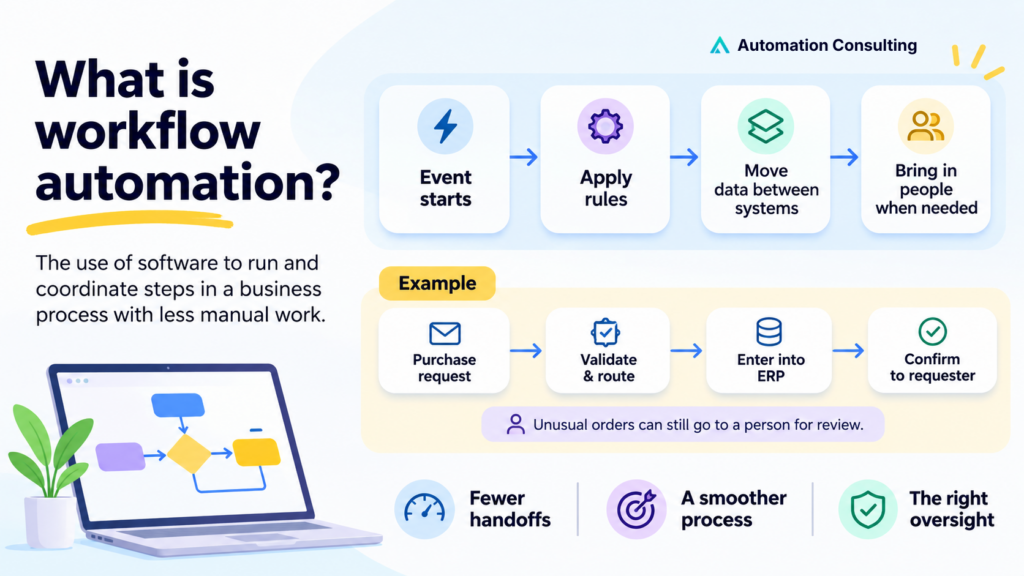
Workflow automation is the use of software to complete, coordinate or route steps in a business process with less manual intervention. A workflow starts with an event, applies defined rules, moves information between systems and brings in people when approval or judgement is needed.
For example, a purchase request that used to arrive by email can be validated automatically, routed to the right approver, entered into an ERP system and confirmed to the requester. Unusual orders can still go to a person for review.
Good automation removes avoidable handoffs and keeps the oversight a process needs. IBM describes workflow automation as software replacing all or part of manual processes. Microsoft describes tools that trigger tasks, apply rules and make processes easier to monitor.
Workflow automation versus BPA, RPA and AI automation:
| Approach | What it does | Example |
|---|---|---|
| Workflow automation | Coordinates tasks, people and systems | Invoice review and approval |
| Business process automation (BPA) | Automates an end-to-end business process | Order capture through to fulfilment and invoicing |
| Robotic process automation (RPA) | Uses software bots to interact with application interfaces | Entering records into a legacy system without an API |
| AI workflow automation | Uses AI for interpretation or classification within a workflow | Reading supplier emails and referring uncertain cases to staff |
These methods can work together. A workflow might use APIs for data exchange, RPA for a legacy application and AI to extract details from documents. The provider should justify the complexity of each component.
Why workflow automation matters in 2026
Every manual handoff adds waiting time. An order sits in an inbox, an approval waits for someone to check, a record gets retyped into a second system. Each delay looks small, but together they set how fast your business can respond.
Published results show how big the gap can be:
- 2 weeks -> 4 hours: In a published Telstra Purple and InfraBuild project, the average time to send an equipment order to a vendor fell from two weeks to about four hours after an automated procurement workflow was introduced.
- 18 hours faster per agreement: Australian organisations reported an average 18-hour reduction in end-to-end cycle time after introducing automated workflows and AI tools. Docusign’s summary puts that at 34% less time from initiation to completion.
- 32% average ROI: Australian firms reported this over the last 12 months from automated and AI-driven tools.
- Peers are already moving: 46% of leaders in Microsoft’s 2025 global Work Trend Index said their organisations were using AI agents to fully automate workstreams or business processes.
If order volumes, customer enquiries or compliance checks are rising, manual copying and inbox follow-ups will cap your capacity. You don’t need AI in every workflow, but you do need to know which processes are worth improving before the bottleneck gets more expensive.
10 best workflow automation services providers in Australia
At a glance:
| Provider | Main focus | A potential fit for |
|---|---|---|
| Automation Consulting | Process automation, ERP integration, custom development, AI agents and engineering teams | Operationally complex businesses needing one team across process and systems |
| The Missing Link | RPA and managed automation | Repetitive tasks in existing applications |
| Avanade | Microsoft Power Platform and intelligent automation | Microsoft-centric organisations |
| Telstra Purple | Power Platform, integration and operational workflows | Microsoft-led enterprise process improvement |
| Data#3 | Microsoft cloud and business applications | Workflow change within a Microsoft modernisation programme |
| Adaptiv | Application and data integration, APIs and automation | Complex cross-platform workflows |
| Atturra | Intelligent document processing and enterprise workflows | Document-heavy processes and SAP environments |
| IBM Consulting | Enterprise workflow orchestration and automation | Large, complex and governed processes |
| Deloitte | Intelligent automation and transformation | Broader operating-model and governance change |
| Capgemini | Intelligent process automation and business operations | High-volume enterprise operations |
1. Automation Consulting
A Sydney-based technology and automation partner for businesses whose operations span several systems. It starts with process discovery, then designs, builds, integrates and supports the solution, without being tied to one platform.
Key strengths:
- Process automation and ERP integration
- Custom software and AI agents where off-the-shelf workflows fall short
- Engineering team augmentation, its managed offshore offering
- Published client outcomes: a hospitality operations lead reports 60%+ less administrative time, and a payments client’s address check completes in seconds
- Up to 20 hours of initial automation work for eligible businesses, under the programme terms
Best for: Growing Australian businesses with disconnected systems and manual handoffs.
What to check: Which capabilities are in scope, what you own after handover and how production support works.
2. The Missing Link
An IT services company offering RPA services, implementation, training and managed automation, including UiPath capability.
Key strengths:
- Run the automation yourself or buy it as a managed service
- Mackay Goodwin project: virtual employee bots handle bank statement entry, BAS and invoicing that were previously outsourced offshore
- Says the project led to a services partnership with HLB International across Australia, New Zealand and Fiji
Best for: Repetitive, rules-based work inside existing applications.
What to check: How the bots handle application interface changes, unattended failures and ongoing support.
3. Avanade
A joint venture of Microsoft and Accenture that builds intelligent automation on Microsoft technology, including Power Automate, as a project or managed service.
Key strengths:
- An automation workshop to identify which processes to automate first
- A migration kit, built with Blueprint Software Systems, that moves bots from other platforms to Power Automate. Avanade says it is about 30% faster and 70% cheaper than manual migration
- Australian public-sector work integrating applications and business systems
Best for: Organisations already invested in Microsoft and Power Platform.
What to check: Which components sit inside the Power Platform scope and whether complex integrations need custom development.
4. Telstra Purple
Microsoft-led automation for enterprise operations. Its headline result comes from the InfraBuild procurement project.

Key strengths:
- Cut InfraBuild’s average time to send an order to a vendor from 2 weeks to about 4 hours
- Built a catalogue-based ordering portal on the Power Platform, shown in InfraBuild’s development environment before production
- Used APIs, Power Apps and Power Automate to automate procurement
- Portal later extended to mobile services, telecommunications, software procurement and printers
Best for: Microsoft-led process improvement with enterprise integrations.
What to check: The handover, integration responsibilities and support model.
5. Data#3
Its Microsoft services are aimed at government and enterprise clients.
Key strengths:
- Dynamics 365 and Power Platform alongside broader cloud services
- Rapid engagements to test whether Dynamics 365 fits before a full production build
- Published customer stories include Glencore Technology (Power Platform) and Penrith City Council (Copilot Readiness Assessment)
Best for: Workflow automation inside a wider Microsoft modernisation programme.
What to check: Who leads process redesign, integration engineering and ongoing support.
6. Adaptiv
A New Zealand-owned data, integration and AI consultancy serving Australian and New Zealand enterprises. Its integration work covers APIs, data and automation.
Key strengths:
- Works across Boomi, Microsoft Azure, MuleSoft, Databricks and Solace
- Trends Promotional Products: more than 50 custom applications and legacy systems moved onto the Boomi platform
- Programmed: Boomi data hub and integration tools connecting vendor systems
- Services run from architecture through implementation and support
Best for: Workflow bottlenecks caused by complex or disconnected applications.
What to check: Which integration platform it recommends, the recurring licence costs and how failed transfers are recovered.
7. Atturra
A self-described SAP Gold Partner offering intelligent document processing and process orchestration.
Key strengths:
- CITIC Pacific Mining project: a compliance application on SAP Business Technology Platform, integrated with SAP SuccessFactors
- Covers document submission, review, approval and secure storage, with automated expiry alerts
- Replaced email-based document handling that created security and privacy risks
- Reports about 200 days of administrative effort saved and $300,000 in productivity gains
Best for: Document-heavy workflows and SAP environments.
What to check: Document accuracy requirements, exception review and fit with existing enterprise controls.
8. IBM Consulting
IBM Business Automation Workflow combines business process management and case management on one platform, and IBM Consulting provides the services around it.
Key strengths:
- Orchestrates straight-through, human-assisted and case-based processes, with visibility into each step
- Handles case work such as credit card dispute resolution, IBM’s own example
- Sold in several editions, from an Express entry point to high-volume automation
- Runs on premises or as a cloud service
Best for: Large, governed processes spanning multiple systems, teams and cases.
What to check: Whether the proposal covers advisory, licences, implementation, managed services or a mix.
9. Deloitte
A large consultancy whose automation capabilities include intelligent automation, robotic automation and AI-enabled process improvement.
Key strengths:
- Reported to have bought The Eclair Group, a Sydney automation specialist
- Described at the time as having the largest team in Australia dedicated to automation services
- Reported as the first consultancy in Asia Pacific at UiPath’s Diamond partner level
Best for: Automation tied to operating-model change, risk and enterprise transformation.
What to check: How responsibility is split between strategy, delivery, change management and operations after launch.
10. Capgemini
Intelligent process automation that combines process change, RPA, AI and analytics, focused on end-to-end business operations.
Key strengths:
- Delivery models range from implementation to operating automation as a service, per its service brochure
- Services Australia work from August 2019 on classifying documents citizens upload with payment claims
- BlueScope finance case study covering process standardisation and intelligent automation
Best for: Redesigning high-volume, cross-functional business operations.
What to check: Which parts of the process the delivery team builds, operates and measures.
How to choose the right workflow automation services provider
Choose the provider whose approach fits your actual process, existing systems, risk requirements and preferred support model. A good proposal explains what happens after deployment, including unusual cases and failures, instead of stopping at a successful demonstration.
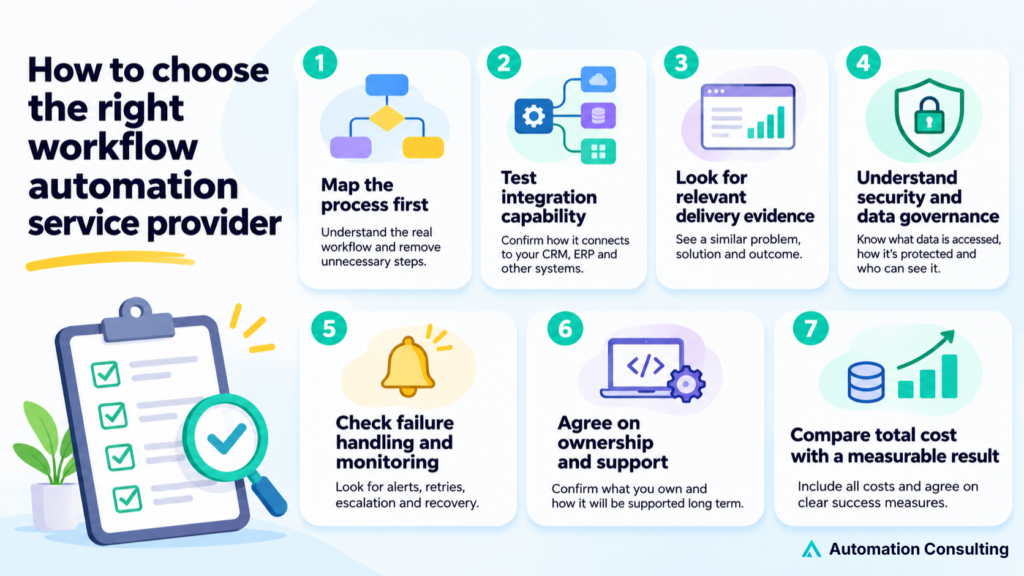
1. Ask them to map the process before choosing software
The provider should understand the real workflow, including approvals, exceptions and unnecessary steps. Automating an inefficient process preserves the inefficiency.
Ask: Which steps would you remove or redesign before automating?
2. Test integration capability
List the exact systems involved, including the ERP, CRM, finance software, documents and legacy applications. Ask whether the provider will use native connectors, APIs, RPA or custom code.
Ask: What happens if one system is unavailable or rejects a record?
3. Look for relevant delivery evidence
A case study should describe the starting problem, the implementation and the business outcome. A row of technology logos doesn’t show delivery capability.
Ask: Can you show a workflow with similar volume, complexity and exception handling?
4. Understand security and data governance
Find out which records the workflow accesses, where they are processed, how credentials are protected and who can see logs and data.
Ask: Who can access production credentials and sensitive data, and how is that access audited?
5. Check failure handling and monitoring
The design should cover alerts, retries, duplicates, escalation and recovery. A silent failure can cause missed orders or inaccurate records.
Ask: Who is notified when an automation fails, and how does the process recover?
6. Agree on ownership and support
Confirm documentation, source code, accounts, licensing, knowledge transfer and support responsibilities. Your business should be able to maintain the system when staff or suppliers change.
Ask: What do we own, and can another engineer maintain the workflow after handover?
7. Compare total cost with a measurable result
Include project fees, licences, usage, hosting, training and maintenance. Record baseline processing time, transaction volume, error rates and any revenue effects before work begins.
Ask: Which recurring costs are excluded from the quote, and how will success be measured?
Business workflows worth automating first
Start with a repeatable process that has enough volume, reasonably clear rules and a measurable cost of delay or error.
- Retail and ecommerce: orders, inventory updates, fulfilment, customer notifications and finance handoffs.
- Equipment distribution: quote approvals, purchasing, supplier updates, stock exceptions and account records.
- Construction and field services: job requests, scheduling, technician reports, compliance documents and invoicing.
- Finance and professional services: onboarding, document verification, approval trails and recurring reporting.
- Internal operations: employee onboarding, access requests, expenses and cross-department approvals.
Measure transaction volume, handling time, rework and errors first. Low-volume activities may not justify custom development. Frequent processes with poor data quality may need cleanup before automation.
Workflow automation trends in 2026
AI-powered automation
AI is moving from drafting text to handling steps inside workflows, such as classifying requests and routing exceptions. Gartner predicts that by 2028 at least 15% of day-to-day work decisions will be made autonomously by AI agents, up from none in 2024.
Hyperautomation
Hyperautomation combines RPA, AI and APIs so one process runs across several systems. It suits work that crosses an ERP, CRM and finance tool, but every extra component is another failure point to monitor.
Human-in-the-loop controls
Review and approval are increasingly built into workflows as steps with named owners and a record of each decision. B EYE’s 2026 review describes the same shift, and it matches how regulated and high-value processes already run.
Cloud-native workflow platforms
Cloud-hosted platforms scale easily and let distributed teams work from the same workflows. Check where data is stored, how access is controlled and how licence costs grow with usage.
Process redesign over bolt-on AI
Gartner warns that integrating agents into legacy systems can be technically complex, disruptive and costly. In many cases it recommends rethinking the workflow from the ground up, which favours providers who simplify a process before choosing technology.
Governance and auditability
Cogent Infotech expects AI governance to become part of core IT governance, with audit-ready records of what automated systems did and why. Expect buyers to ask for logs, access controls and clear ownership before they sign.
Most of these trends take more than buying a tool. They need process mapping, system integration, testing and ongoing monitoring, which is where an experienced partner saves time. If you’re unsure which trend fits your business, Automation Consulting can help you pick one workflow, prove it and scale from there.
Frequently asked questions
Workflow automation helps businesses assess, redesign, implement and maintain automated processes. It can include process mapping, systems integration, RPA, AI-assisted steps, testing, monitoring and support.
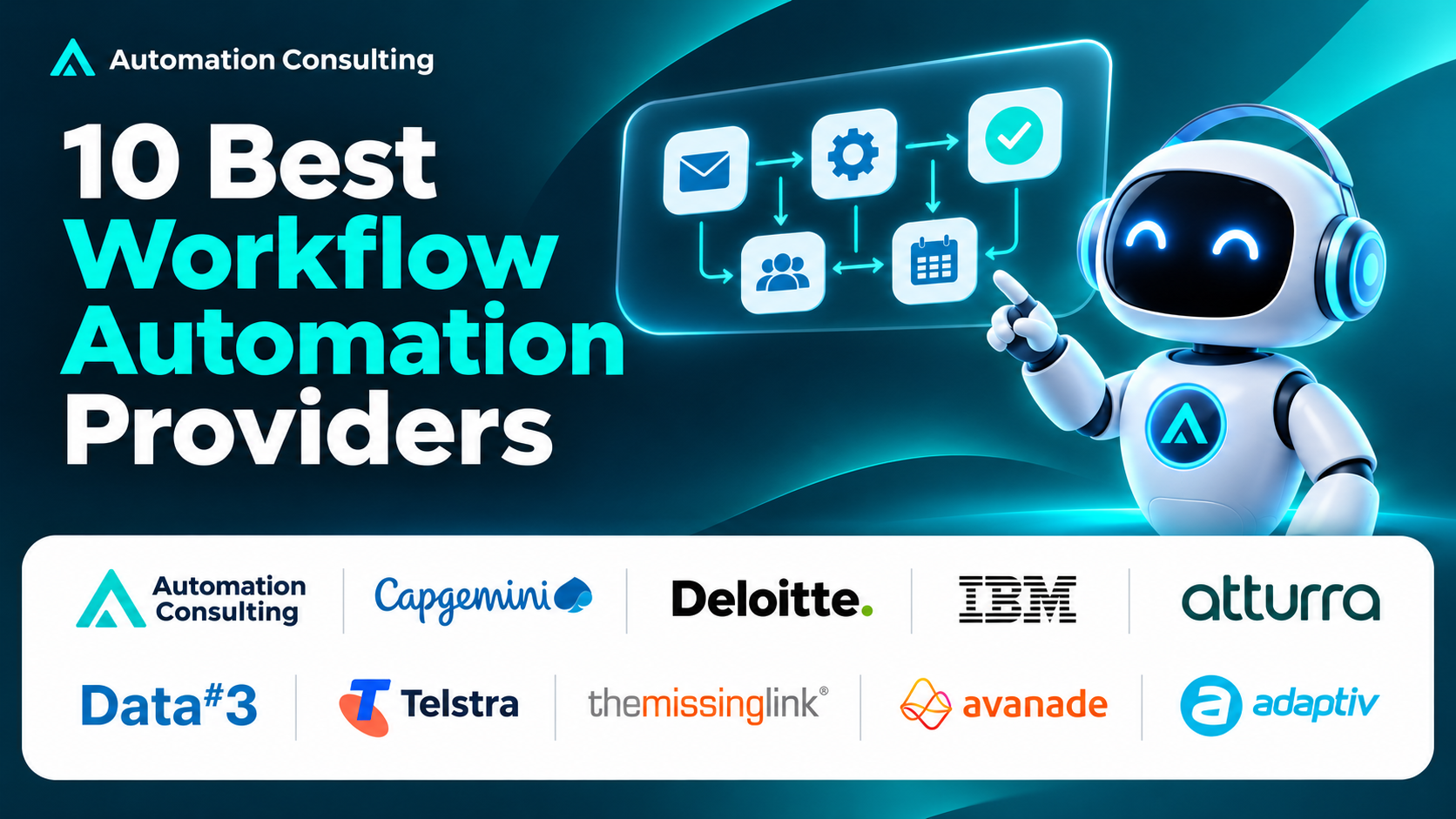
Options worth comparing include Automation Consulting, The Missing Link, Avanade, Telstra Purple, Data#3, Adaptiv, Atturra, IBM Consulting, Deloitte and Capgemini. Their delivery models and strengths differ, so the right choice depends on your requirements, not a universal ranking.
A tool supplies the technology to build workflows. A provider designs and implements the solution for your business, often using several tools or custom integrations.
Often, yes. APIs, connectors, integration platforms or RPA may let existing systems work together. The options depend on each application’s integration and access capabilities.
A focused workflow using existing connectors may take weeks. Cross-system programmes involving legacy applications, complex rules, governance or data migration can take longer. Ask for a staged plan and acceptance criteria.
It should specify the process, desired outcome, systems, integrations, exception paths, access controls, deliverables, tests, ownership, timeline, recurring costs and post-launch responsibilities.
Compare delivery, not just provider names
The right workflow automation services provider can explain your business process, show how it will work across your systems and take responsibility for a reliable production result. Shortlist against your actual requirements, ask for relevant evidence and agree on support and ownership before committing.
If manual handoffs across an ERP, CRM, finance platform or custom systems are slowing you down, Automation Consulting’s workflow automation services combine process design with software engineering, ERP integration and AI development. Start with one costly workflow, establish its baseline and see whether a focused implementation proves value before you expand. Up to 20 hours of initial automation work is available under the programme terms on our website.
See more Automation Consulting insights in your search results
Tell Google you’d like more of our thinking, and the next piece turns up where you’re already looking.